What Is Callback Software? Features, Use Cases and top 7 tools
Callback software helps customers connect with a real person quickly, without waiting on hold or filling out long forms. This article is for business owners, marketers, and customer service managers looking to improve lead generation and customer satisfaction using callback.
Summary:
- What is a Callback Software?
- How does instant callback software help improve conversion rates?
- Is a callback function the same as callback software?
- How Callback Software Works?
- Most Common Features of Callback Software for Customers
- Best Practices for Callback Software
- Common Challenges and Solutions
- Future Trends in Callback Software
- Top 7 Best Callback Software Tools
What is a Callback Software?
It’s a specialized software that turns website traffic into actionable leads. It automates the connection between the company and interested website visitors by initiating phone calls. Rather than having potential customers fill out a form and wait for a follow-up, this software enables immediate or scheduled phone calls directly from the website to the business. During this process, customers are placed in a queue or virtual queue, and the callback service automatically reconnects with those who had missed calls.
How does instant callback software help improve conversion rates?
Instant callback software helps increase website conversions by removing the biggest barrier in online sales - waiting. When a visitor is ready to talk, they can request a call and get connected almost immediately, before they leave the page or get distracted. That fast response makes a huge difference, because the lead is still engaged and interested.
Since you can control when and to whom the pop up appears, you focus on high-intent visitors and turn more of them into real conversations - without increasing your marketing spend.
Is a callback function the same as callback software?
CallBack Software and CallBack widgets are often confused with callback function. While they may sound similar, they mean very different things. A callback function is a programming concept — it’s a function that gets passed into another function and runs later, usually after a task is finished or when a specific event happens. It lives inside code and helps developers control how software behaves. On the other hand, callback software us a tool used on websites to connect businesses with potential customers by letting visitors request an instant phone call. So even though they share the same name, one belongs to the world of coding, and the other is a customer communication solution.
Now that we've clarified the distinction, let's look at how callback software actually works in practice.
How Callback Software Works
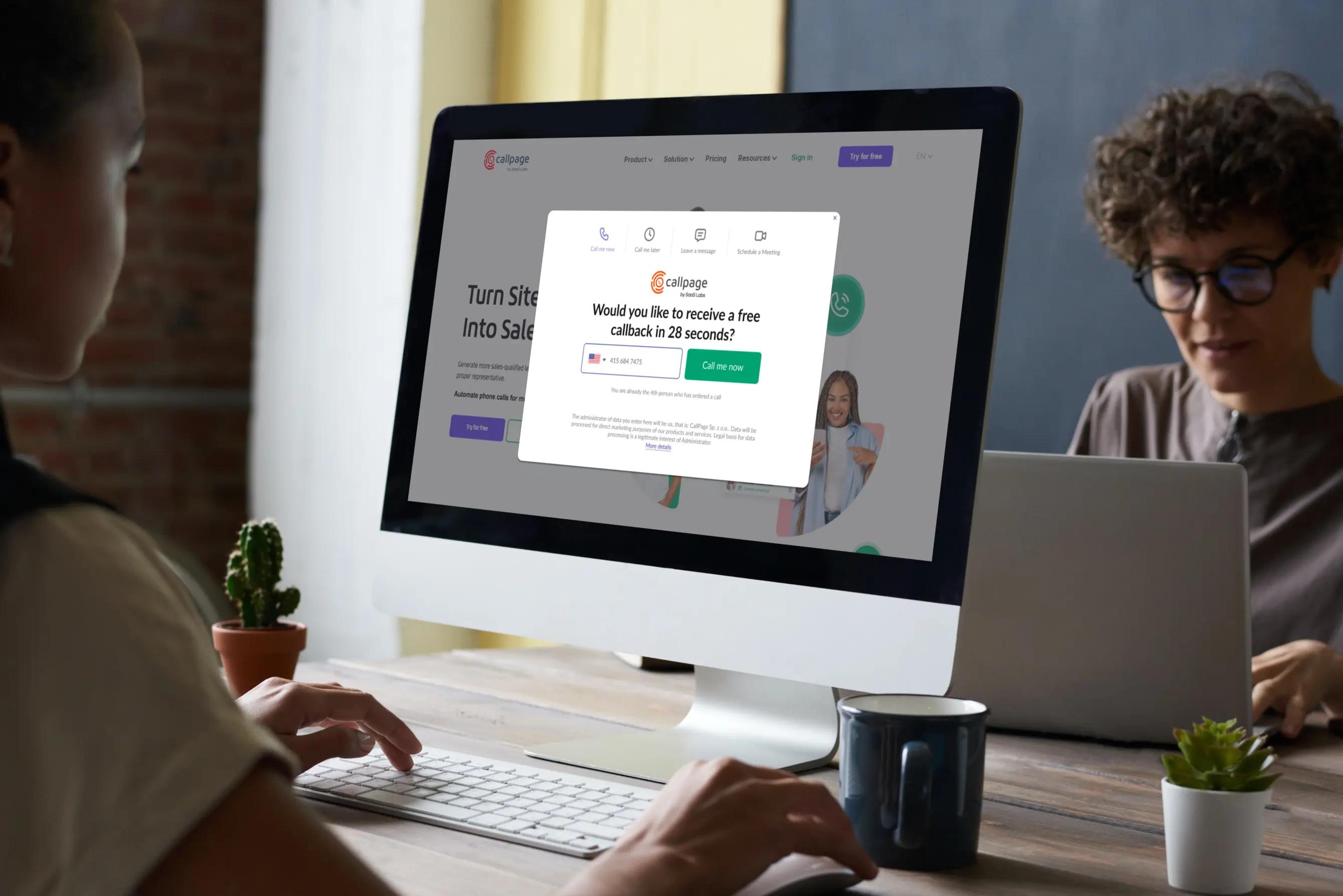
The callback software provides a widget that appears on a website and a dashboard panel with extensive settings to customize the callback form and widget. Callback software also allows tracking of all leads in the Analytics Panel. More information about this is provided below.
The process of callback is designed to be user-friendly and efficient, both for the website visitor and the business.
Visitor Engagement
- Visitor Engagement: When a visitor lands on your website, a pop-up appears. Additionally, some callback offers scoring rules which trigger the pop-up based on specific actions, such as time on page or exit intent.
Call Request
- Call Request: The pop up prompts visitors to enter their data, like a phone number, to request an immediate or scheduled callback.
Backend Trigger
- Backend Trigger: Once the visitor submits their number, the software automatically places the callback into a queue and initiates an outbound call to the visitor using the caller's number. The system can direct the call to a designated sales representative or route it through an automated system to the appropriate department.
Connecting the Call
- Connecting the Call: The system routes the outbound call to available consultants to ensure a prompt response. When both parties are on the line, the calls are connected.
Data Collection
- Data Collection: Throughout this process, the software collects data about the lead, including storing the caller's number for automatic dialing and efficient connection. Some products, such as CallPage, provide analytics that can be used to measure the effectiveness of the call. This includes call recordings, call duration, visitor location, source of visit (UTM), and the webpage from which the call was initiated.
CRM Integration
- CRM Integration: The collected data can be automatically sent to your CRM system for future follow-ups and lead nurturing.
Callback software can connect website visitors with a company representative in seconds. The whole process is automatic, making it a practical addition to any digital marketing and sales strategy.
READ ALSO: 9 Reasons You Should Consider Using Callback
Now that you know how callback software works, let's examine the most common features you should look for.
Most Common Features of Callback Software for Customers
Here are some of the key features you can expect:
- Instant Callback: One of the standout features is the ability to initiate a phone call within seconds of a visitor showing interest. This immediate response can significantly improve conversion rates.
- Scheduled Calls: The software allows call scheduling for visitors who prefer to speak later. This ensures you don't miss out on leads who may visit your website outside business hours.
- Call Routing: The software can intelligently route calls to the appropriate team member based on the criteria you enter into the system.
- Virtual Numbers with PBX system: Most callback software offers the added benefit of a virtual number that is connected to a virtual PBX system. The system offers local or international phone numbers and efficiently distributes calls to the right people or departments through its virtual PBX. It allows you to manage all company calls from a single dashboard.
- Analytics and Reporting: Analytics tools are often built into the software, allowing you to track key performance indicators (KPIs) such as conversion rates and lead quality.
- CRM Integration: Many callback software options offer seamless integration with customer relationship management (CRM) systems, making managing and following up with leads easier.
- Call Recording: The software often includes a call recording feature for quality assurance and training purposes.
- Mobile Responsiveness: Given the increasing use of mobile devices, a good callback software is usually optimized for mobile experiences, ensuring you don't miss out on leads coming from smartphones or tablets.
- SMS Follow-ups: After the call, an automated SMS can be sent to both the consultant and the potential customer.
- AI Voice Agent: The AI agent can answer calls after working hours or route calls to the most appropriate team member based on the conversation.
When considering callback software, knowing which features to look for is important. Keep in mind that not all software may offer every feature. However, these features can still be beneficial in improving conversion rates.
When choosing which software to use, consider which features are most important to your business needs. One callback software that provides all of the above features is CallPage.
Now that we've covered the key features, let's explore which industries benefit most from callback software.
Best Practices for Callback Software
To get the most out of your callback software, it’s important to follow best practices that ensure both customers and agents benefit from the system.
Integration with Existing Platforms
- Ensure seamless integration with your existing platforms-this allows callback requests to flow smoothly into your CRM or support tools, giving agents immediate access to customer information and previous interactions.
Managing Peak Hours
- Configure your callback system to handle peak periods by enabling features like call queues, automatic call retries, and adding a backup consultant who will be contacted only if the main consultant can’t answer (you can also use an AI Voice Agent for this). This helps manage high call volumes, reduces call abandonment rates, and ensures customers aren’t left waiting on hold.
Follow-Ups
- Send automatic call follow-ups with the next steps or the consultant’s contact details. Display the consultant’s information directly in the callback pop-up or set up a satisfaction survey after the call ends (it can appear in the pop-up right after the conversation).
Monitoring and Analytics
- Regularly monitor and analyze callback requests, agent availability, and customer satisfaction metrics. Use this data to identify bottlenecks, optimize agent schedules, and refine your callback strategy. Support your agents with ongoing training and excellent support to ensure they can handle callbacks efficiently, even during busy times. Set up automated reports that are sent straight to the manager’s inbox.
By implementing these best practices, you’ll reduce agent idle time, improve customer engagement, and deliver an exceptional customer experience—turning every callback into a positive touchpoint for your business.
With best practices in place, it's crucial to measure the success of your callback system to ensure ongoing improvement.
Common Challenges and Solutions
While callback software offers significant benefits, businesses may encounter challenges such as managing peak periods, reducing abandonment rates, and ensuring agent availability.
Managing Peak Periods and Reducing Abandonment
- Deploy advanced callback software that uses a generic function to intelligently handle incoming calls and callback requests. This type of system can automatically place outbound calls to customers, minimizing manual effort and reducing agent idle time.
- Offer a callback option that lets customers choose a convenient time for their call to help reduce long wait times and improve customer satisfaction.
- During peak periods, features like AI Voice Agent and scheduled callbacks ensure that no customer is left behind, even when call volumes spike.
Agent Training and Support
- Provide excellent support and comprehensive training for agents. Well-prepared agents can handle callbacks efficiently, personalize each interaction, and turn every call into a positive experience or sale.
By addressing these challenges, you can ensure your callback software delivers consistent value and a superior customer experience.
Looking ahead, let's see how callback software is evolving with new technology.
Future Trends in Callback Software
Important trend: In 2026, callback solutions are increasingly integrating with AI voicebots. If no sales representative answers the call, an intelligent bot can conduct initial lead qualification before scheduling a conversation with a human.
AI can also generate automatic call summaries, create follow-up tasks for sales reps, and even adjust pop-up messages in real time to improve conversion rates and customer satisfaction. These are just a few examples of how AI can enhance callback software. Despite what some predicted, this market is still growing. Many people continue to prefer speaking on the phone, and in a time when users expect faster responses than ever, instant callbacks are becoming even more valuable.
Callback solutions are also gaining importance alongside the rise of conversational marketing, as brands realize that modern marketing is about responding instantly and turning interest into real conversations the moment it appears.
Top 7 Best Callback Software Tools in 2026
1. CallPage
CallPage focuses on ultra-fast connection times and automated outbound dialing within seconds. It combines instant callbacks, scheduled calls, lead routing, analytics, and CRM integrations in one tool. A major strength is its aggressive speed-to-lead approach, which directly impacts conversion rates. It also includes a Voice Agent that can be connected directly to the software.
2. Limecall
Limecall offers instant callbacks and web-to-phone connections with strong real-time engagement features. It’s easy to install and works well for startups and mid-sized companies. A big advantage is its simple UI and quick setup. However, its analytics and automation depth are not as advanced as some enterprise-level tools.
3. Callback24
Callback24 provides instant and scheduled callbacks with international number support. It’s flexible and integrates with multiple CMS platforms and CRMs. One strong side is its affordability for smaller teams. On the weaker side, customization and advanced reporting options are somewhat limited.
4. Chili Piper
Chili Piper is primarily known for intelligent meeting routing but also supports instant qualification and call distribution. It’s especially powerful for B2B companies with complex sales structures. Its routing logic and calendar automation are excellent. However, it’s more of a meeting automation tool than a pure callback widget, and pricing can be high.
5. HubSpot (with call features)
HubSpot offers callback-like functionality through its forms, workflows, and call tracking tools. Its biggest strength is full ecosystem integration—CRM, automation, email marketing, and reporting in one place. It’s ideal for companies already using HubSpot. The drawback is that instant callback functionality is not its core feature and may require additional setup.
6. Zoho SalesIQ
Zoho SalesIQ integrates live chat, visitor tracking, and callback options within the Zoho ecosystem. It works well for businesses already using Zoho CRM. Its multichannel capabilities are a strong plus. On the downside, callback features are not as central or specialized as in dedicated callback tools.
7. Five9
Five9 is a cloud contact center platform with intelligent callback management and AI routing. It’s built for high-volume environments and enterprise-grade operations. Advanced analytics and workforce optimization are strong points. The downside is complexity and pricing, which may not suit small businesses
FAQ
What is callback software?
Callback software is a website tool that lets visitors request an instant phone call from a company. The user enters their phone number, and the system automatically connects them with a sales representative within seconds. It is designed to reduce response time and increase website conversions.
How does website callback work?
Website callback works in three simple steps:
- The visitor enters their phone number in a pop up.
- The system calls the sales representative.
- Once answered, it connects the rep with the visitor.
The entire process usually takes less than 30 seconds.
Does callback software increase conversions?
Yes, callback software increases conversions by reducing response time to near zero. Fast contact significantly improves the chance of reaching and converting a lead. When visitors receive a call immediately, they are more engaged and less likely to contact competitors.
What is the difference between callback and a contact form?
The main difference is response time.
- A contact form collects information and requires follow-up later.
- Callback software connects the visitor with a sales rep immediately.
Callback shortens the sales cycle and improves lead qualification.
Is callback better than live chat?
Callback is better when a real conversation is needed. Live chat works well for quick questions, while callback is more effective for sales discussions, complex offers, and high-value leads. Many companies use both tools together for best results.
Why do visitors leave their phone number?
Visitors leave their phone number when:
- They are genuinely interested in the offer.
- The call is promised within seconds.
- The value of speaking with a representative is clear.
Instant callback reduces hesitation and increases trust.
Does callback software work on mobile?
Yes, modern callback softwares, such as CallPage are fully mobile-friendly. They adapt to smaller screens and allow users to request a call easily from smartphones. In many industries, mobile users convert very well through callback tools.
How much does callback software cost?
Callback software pricing typically depends on:
- Number of calls per month
- Number of users
- Advanced features and integrations
Most providers offer subscription-based pricing and free trial options.
Can callback software integrate with CRM?
Yes, most callback tools integrate with CRM systems. Integration allows automatic lead creation, call tracking, performance reporting, and better sales management. This helps measure ROI and improve conversion rates.
In which industries does callback software work best?
Callback software works best in industries where direct conversation drives sales, such as:
- SaaS and technology
- B2B services
- Real estate
- Finance and insurance
- Healthcare
- Education
It is especially effective for high-value or complex offers.
Is callback software worth it in 2026?
Yes. With increasing competition and shorter attention spans, instant response time is a major advantage. Callback tools help businesses capture leads before they leave the website.
Is callback software the same as click to call?
No, callback software is not the same as click to call.
The main difference is who initiates the call:
- Click to call allows users to call your company directly by clicking a phone number (usually on mobile).
- Callback software asks users to enter their phone number, and the system automatically connects them with a sales representative.
Click to call depends on the visitor starting the call. Callback reduces friction by handling the connection automatically and often includes features like scheduling, routing, and CRM integration.
Check out other posts
Start generating leads today!
Get a 14-day free trial now,
set up the widget on your site, and see how many more leads you can capture with CallPage
- No credit card required
- 10 minutes set up
- 14 days fully-features free trial