10 Best Lead Capture Software Tools for 2026/2027
Getting people to your website is only half the job. The other half is turning that traffic into leads you can actually follow up with. That is where lead capture software comes in. Check the list of 10 best tools to try in 2026/2027.
Summary:
- What Is Lead Capture Software?
- Phone & Conversational Lead Capture
- Forms & Lead Qualification
- Pop-ups & Landing Pages
- Interactive Lead Generation
- CRM-Integrated & Account-Based Capture
- B2B Special Category: Anonymous Visitor Identification
- Lead Capture Software Comparison Matrix
- Key Criteria When Evaluating Lead Capture Tools
A visitor can spend five minutes reading your product pages, check your pricing, compare your offer with competitors, and leave without giving your sales team any way to contact them. The interest was there, but the opportunity was lost.
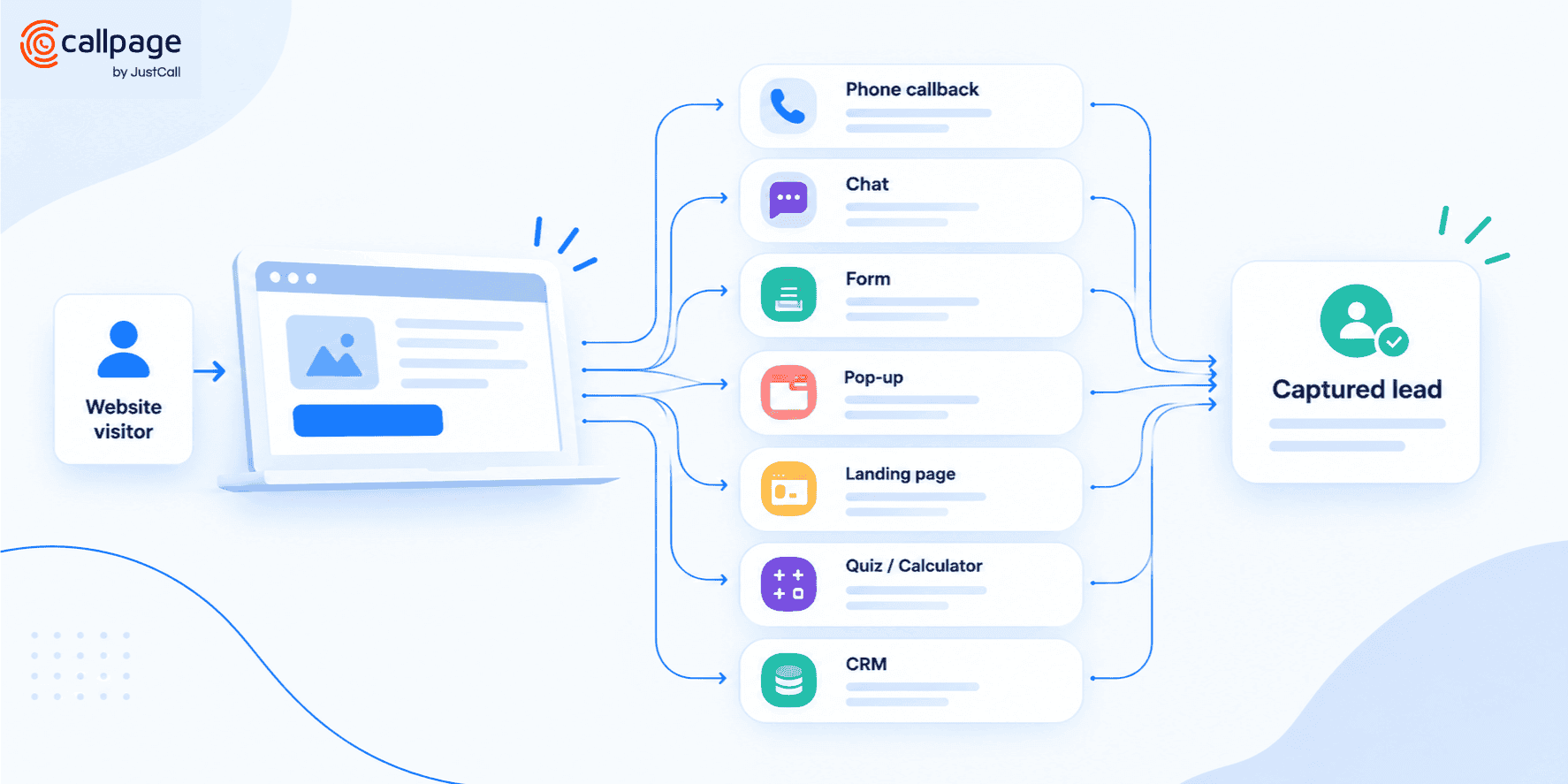
Lead capture tools give interested visitors a clear way to identify themselves and start the next step in the buying process. That might mean requesting a callback, starting a chat, filling out a form, signing up for an offer, completing a quiz, or submitting a request through a dedicated landing page.
And this is where choosing the right tool gets interesting.
Lead capture is no longer just about putting a static form on a website. In 2026 and 2027, lead capture is defined by real-time engagement, AI-driven qualification, and seamless multi-channel routing. The best approach depends on how your customers prefer to engage with you.
In this guide, we look at the best lead capture software for 2026/2027 and group the tools by how they capture leads, what they excel at, and where they might not be the right fit.
What Is Lead Capture Software?
Lead capture software helps businesses collect contact information and other useful data from people who show interest in their products or services.
The most familiar example is a website form asking for a name and email address. But lead capture can happen much earlier in the buying process and through many different channels.
A visitor might request an immediate callback, start an AI-guided chat conversation, sign up for a resource, complete a questionnaire, use an interactive pricing calculator, or book a consultation.
The important part is what happens next.
A good lead capture process gives a business enough information to understand who the visitor is, what they are interested in, and what the next step should be.
Lead capture software sits at the exact moment where anonymous website traffic becomes something a business can measure and convert.
The Best Lead Capture Software for 2026/2027
Phone & Conversational Lead Capture
For high-value or complex offerings, the shortest path from a website visit to a sales opportunity is a direct conversation.
1. CallPage
- Best for: Phone-based lead capture and AI voice qualification
- Main use case: Instant callbacks, scheduled calls, and automated voice qualification
CallPage is built for businesses that want to turn website visitors into immediate sales conversations. Its core functionality is callback lead capture: instead of filling out a form and waiting hours for a response, a visitor requests a call and is connected to a representative within seconds.
Beyond standard callback widgets, CallPage features an AI Voice Agent capable of answering incoming calls, answering routine questions, and qualifying prospect intent around the clock.
- Key features: Instant callbacks, scheduled calls, message capture, smart call routing, lead scoring, call tracking & recording, CRM integrations, AI Voice Agent, UTM tracking.
- Best for: B2C, professional services, automotive, real estate, financial services, and high-ticket sales.
- When not to use: Low-touch ecommerce or purely self-serve digital products where buyers prefer asynchronous email communication.
2. Intercom
- Best for: Conversational lead capture & AI sales agents
- Main use case: Live chat and autonomous AI chat agents
Intercom takes a conversation-first approach to lead capture. Powered by advanced AI customer service and sales agents, Intercom enables visitors to ask complex questions, receive answers instantly, and submit contact details organically during the chat flow.
Sales teams can set automated qualification rules (e.g., asking for company size or role) before routing high-intent prospects directly to a live account executive.
- Key features: Live chat, autonomous AI agents, automated qualification workflows, lead routing, contact capture, deep CRM integrations.
- Best for: SaaS, tech startups, B2B platforms, and product-led growth (PLG) businesses.
- When NOT to use: Small businesses or non-technical teams looking for a simple, budget-friendly contact form widget.
3. Tidio
- Best for: Chatbot-based lead capture for SMBs
- Main use case: Combining automated AI chat with human support
Tidio combines live chat with lightweight automated bots. Its AI bots can capture contact details, ask qualifying questions, and transfer conversations to human agents when specific buying signals are triggered.
It is particularly well-suited for smaller teams that want to engage visitors 24/7 without needing full-time sales coverage on chat.
- Key features: Live chat, AI chatbots, visual flow builder, lead qualification, contact capture, CRM & ecommerce integrations.
- Best for: SMBs, ecommerce stores, agencies, and teams combining customer service with lead generation.
- When NOT to use: Enterprise B2B organizations requiring complex account-based routing and multi-tier approval workflows.
Forms & Lead Qualification
When you need structured, detailed information before handing a lead to sales, multi-step and logic-driven forms remain essential.
4. Typeform
- Best for: Interactive, high-converting lead qualification
- Main use case: Multi-step, conditional qualification forms
Typeform replaces long, overwhelming forms with a conversational, one-question-at-a-time experience. Conditional logic adapts the questions dynamically based on prior responses, enabling you to capture contact info while assessing budget, timeline, and company size.
- Key features: One-question-at-a-time layout, conditional logic, customizable templates, mobile optimization, native CRM sync.
- Best for: Agencies, consultancies, SaaS demos, and high-touch service providers.
- When NOT to use: Micro-conversions (e.g., simple newsletter signups) where adding steps increases drop-off rates.
5. Jotform
- Best for: Flexible, detailed data collection forms
- Main use case: Complex applications, quotes, and multi-field submissions
Jotform is a comprehensive form builder with thousands of templates. It excels when you need to collect extensive information—such as file attachments, custom specifications, or signatures—during the lead capture process.
- Key features: Extensive template library, conditional logic, file upload fields, electronic signatures, workflow automation, payment integrations.
- Best for: Real estate, education, legal, medical, and service businesses requiring comprehensive intake forms.
- When NOT to use: Fast-paced conversational qualification where speed and chat-like interactions drive conversions.
Pop-ups & Landing Pages
For visitors who are not yet ready to talk to sales, micro-commitments—such as downloading a whitepaper, receiving a discount, or registering for an event—keep the buyer journey moving.
6. OptinMonster
- Best for: On-site pop-ups and exit-intent capture
- Main use case: Converting departing or browsing traffic into subscribers
OptinMonster specializes in capturing leads before they bounce. Using behavioral triggers (like exit intent, scroll depth, or time on page), it displays targeted overlays, slide-ins, and floating banners promoting relevant lead magnets or special offers.
- Key features: Exit-intent technology, A/B testing, floating bars, slide-in widgets, page-level targeting, email marketing integrations.
- Best for: Ecommerce stores, content publishers, blogs, and marketing teams growing email lists.
- When NOT to use: Complex B2B sales pipelines where an email address alone without qualification data is insufficient.
7. Unbounce
- Best for: Dedicated landing page lead capture
- Main use case: Campaign-specific landing pages for paid ads and webinars
Unbounce allows marketers to build standalone landing pages engineered around a single call to action. Instead of sending ad traffic to a distracting main website, Unbounce isolates the visitor with focused messaging and optimized capture forms.
- Key features: Drag-and-drop builder, AI landing page generation, dynamic text replacement, smart traffic routing, form builder.
- Best for: Performance marketers, PPC campaign managers, SaaS product launches, and event signups.
- When NOT to use: General website lead capture where forms need to be embedded across existing content pages.
Interactive Lead Generation
Giving visitors immediate value in exchange for their contact information significantly increases conversion rates.
8. Outgrow
- Best for: Quizzes, ROI calculators, and interactive tools
- Main use case: Value-first lead capture through personalized results
Outgrow lets businesses create interactive tools—such as pricing calculators, savings estimators, diagnostic quizzes, and benchmark assessments. Users input their parameters and unlock personalized insights by providing their contact details.
- Key features: Custom calculators, interactive quizzes, recommendation engines, gated results, conditional outcomes, CRM syncing.
- Best for: Financial services, SaaS pricing pages, consultancies, and marketing agencies.
- When NOT to use: Simple lead generation needs where constructing a multi-variable calculator adds unnecessary complexity.
CRM-Integrated & Account-Based Capture
When lead capture is directly embedded in your core customer database, speed-to-lead improves dramatically.
9. HubSpot
- Best for: All-in-one inbound lead management
- Main use case: Full-funnel lead capture connected to a central CRM
HubSpot provides a complete ecosystem including forms, popup banners, landing pages, live chat, and AI assistants. Every submission flows directly into the HubSpot CRM, triggering automated lead scoring, email nurture sequences, and sales team task creation.
- Key features: Drag-and-drop form builder, native CRM, CTA tracking, landing pages, live chat, automated lead scoring and assignment.
- Best for: Mid-market B2B companies, inbound marketing teams, and organizations wanting a unified tech stack.
- When NOT to use: Teams seeking a quick, standalone lead widget without committing to an end-to-end CRM infrastructure.
10. Pipedrive (LeadBooster)
- Best for: Sales-driven CRM lead capture
- Main use case: Converting web visitors directly into pipeline deals
Pipedrive's LeadBooster add-on equips sales teams with Web Forms, Chatbots, Live Chat, and Prospector tools. Submissions immediately create deals or lead records inside the sales pipeline, assigning ownership to specific account reps.
- Key features: Web Forms, LeadBooster chatbot, live chat routing, pipeline deal creation, custom fields, sales activity scheduling.
- Best for: Outbound and inbound sales teams using Pipedrive as their primary CRM.
- When NOT to use: Marketing-heavy organizations focused primarily on content downloads, newsletter growth, and complex email nurturing.
B2B Special Category: Anonymous Visitor Identification
Leadfeeder
- Best for: B2B website visitor de-anonymization
- Main use case: Identifying target companies visiting your site without submitting forms
Leadfeeder operates differently from traditional form-based capture. It identifies the organizations visiting your site based on IP tracking and firmographic data, showing which pages they viewed and how often they returned.
- Key features: Account-level identification, behavioral tracking, intent scoring, CRM enrichment, sales alert notifications.
- Best for: B2B ABM (Account-Based Marketing) teams, outbound sales reps, and enterprise SaaS companies.
- When NOT to use: B2C businesses, ecommerce stores, or teams looking to capture individual personal contact details automatically.
Lead Capture Software Comparison Matrix
| Tool | Primary Focus | Best Lead Capture Method | When NOT to Use |
| CallPage | Phone / Voice Capture | Instant callback & AI Voice Agent | Low-touch ecommerce / Async-only sales |
| Intercom | Conversational AI | AI Chat agents & live chat | Simple websites needing a basic contact form |
| Tidio | SMB Chatbot | Live chat & simple chat automation | Large enterprise B2B sales pipelines |
| Typeform | Qualification Forms | One-question-at-a-time forms | 1-field newsletter opt-in forms |
| Jotform | Detailed Data Collection | Multi-field web intake forms | Fast-paced conversational qualification |
| OptinMonster | Pop-ups & Overlays | Exit-intent banners & pop-ups | High-intent B2B demo request flows |
| Unbounce | Landing Pages | Campaign landing pages & forms | Full website site-wide form management |
| Outgrow | Interactive Content | Calculators, quizzes & assessments | Basic contact/inquiry forms |
| HubSpot | All-in-One CRM | Forms, chat, CTAs, landing pages | Teams looking for a standalone widget |
| Pipedrive | Pipeline Sales | Web Forms & LeadBooster chat | Content marketing & newsletter list growth |
| Leadfeeder | B2B Identification | Anonymous company IP tracking | B2C or personal email identification |
Key Criteria When Evaluating Lead Capture Tools
- Speed to Lead: Can the tool trigger an immediate response (like a phone call or AI chat answer) within seconds of submission?
- CRM & Stack Integration: Does the data flow directly into your CRM without relying on manual CSV exports or broken webhooks?
- Qualification Depth: Can you segment high-value prospects from low-intent leads automatically?
- Mobile Experience: Does the capture mechanism function smoothly on smartphones without obstructing navigation?
- User Experience & Friction: Does the widget add value to the visitor's journey, or does it feel intrusive?
Frequently Asked Questions
What is lead capture software?
Lead capture software consists of digital tools designed to collect contact information and intent data from website visitors, turning anonymous traffic into identifiable leads.
What is the difference between lead generation and lead capture?
Lead generation encompasses all marketing efforts that attract traffic to your business. Lead capture is the specific conversion step where a visitor provides their details to initiate contact.
Can lead capture software qualify leads automatically?
Yes. Modern lead capture tools use conditional logic, scoring models, and AI agents to qualify leads based on budget, company size, timeline, and behavior before routing them to sales reps.
Is a CRM required to use lead capture software?
No, but connecting your capture tools to a CRM (or using a built-in CRM like HubSpot or Pipedrive) ensures leads are followed up promptly without data loss.
Final Thoughts
Effective lead capture is not about placing as many forms or pop-ups on your website as possible. It is about matching your capture method to your customer's buying behavior.
- High-intent buyers looking for answers appreciate instant phone calls (CallPage) or interactive chat (Intercom).
- Buyers researching options benefit from calculators (Outgrow) or qualification forms (Typeform).
- Browsers leaving the site respond best to exit-intent offers (OptinMonster).
Aligning your lead capture strategy with visitor intent creates a frictionless path from anonymous browsing to active pipeline opportunity.
Start generating leads today!
Get a 14-day free trial now,
set up the widget on your site, and see how many more leads you can capture with CallPage
- No credit card required
- 10 minutes set up
- 14 days fully-features free trial