
Conversion Rate Optimization (CRO) for Beginners – A 2026 Guide
CRO, or Conversion Rate Optimization, is a set of actions aimed at getting more visitors to your website to take a desired action — make a purchase, fill out a form, call you, or sign up for a newsletter. This article will show you what it’s all about, which techniques actually work in practice, and where to start — even if you’re on a tight budget. While CRO is often associated primarily with online stores, this article takes a broader view and shows that conversion optimization isn’t just for e-commerce.
Introduction to CRO
Conversion Rate Optimization (CRO) is a systematic process designed to help businesses get more value from their existing website visitors. Instead of simply driving more traffic, CRO focuses on increasing the percentage of users who take a desired action—whether that’s filling out a form, making a purchase, or scheduling a call. By refining your website or landing page, you can turn more visitors into leads or customers, making every click count.
At its core, conversion rate optimization CRO is about understanding what motivates your audience, identifying where users drop off, and making targeted improvements that encourage them to complete your desired action. This approach to rate optimization doesn’t just boost your bottom line—it also helps you make smarter decisions about your marketing and website investments.
Whether you’re running a SaaS platform, an e-commerce store, or a service-based business, CRO can help you maximize the impact of your website traffic and drive sustainable growth. In the following sections, we’ll break down what conversion rate optimization really means, why it’s so valuable, and how you can start applying it to your own landing pages.
Benefits of CRO
Investing in conversion rate optimization offers a wide range of benefits that go far beyond just increasing sales. By focusing on improving your conversion rate, you can make your marketing more efficient and your website more effective at turning visitors into customers.
Some of the key benefits of a strong CRO strategy include:
- Increased conversions and revenue: Even small improvements in your conversion rate can lead to significant gains in leads, sales, or sign-ups.
- Lower customer acquisition costs: By getting more value from your existing traffic, you reduce the need to spend more on ads or other acquisition channels.
- Improved ROI: Every optimization effort helps you get a better return on your marketing investments.
- Enhanced user experience and engagement: CRO often uncovers pain points in the user journey, leading to a smoother, more enjoyable experience for your target audience.
- Deeper understanding of your audience: Analyzing user behavior and collecting feedback helps you identify what your visitors need and what’s holding them back.
- More effective marketing strategies: Insights from CRO can inform your messaging, offers, and overall digital marketing approach.
- Stronger brand reputation and customer loyalty: A website that’s easy to use and delivers value builds trust and keeps customers coming back.
- Competitive advantage: Businesses that prioritize CRO are better positioned to adapt to changing user expectations and outperform their competitors.
By making conversion rate optimization a core part of your digital strategy, you can unlock more conversions, higher revenue, and a better experience for every visitor. Next, we’ll dive into the essential elements of a CRO strategy and how you can start optimizing your own landing pages for success.
How Do You Calculate Your Conversion Rate?
Your conversion rate is the percentage of website visitors who completed a desired action — for example, purchased a product or scheduled a meeting with your sales team. A conversion isn’t necessarily a sale. Depending on your type of business, it could be:
- Filling out a contact form
- Booking a consultation or appointment
- Downloading a resource (e-book, pricing sheet)
- Calling your business
- Placing an order in your store
- Signing up for a free trial
The primary goal of conversion rate optimization (CRO) is to increase the number of leads generated by a business. Tracking leads generated, along with key profitability metrics like cost per lead, is essential for measuring the success of your CRO strategies.
To calculate conversion rate, use the following formula: (Number of conversions ÷ Total number of visitors) × 100. For example, if your website gets 1,000 visitors per month and 20 of them buy a product, your conversion rate is 2%.
The average conversion rate is typically between 2% and 5%, but what is considered a good conversion rate can vary by industry and specific business goals. The best-optimized sites reach 10–12% or more. The difference, as you can see, is massive — though keep in mind that your website's conversion rate depends not only on your website, but also on your industry and the quality of traffic you’re driving to your site.
Depending on where your site currently stands, CRO can typically help you improve your website's conversion rate by anywhere from 20% to 100% over your current baseline. If your main objective is to increase lead conversion rate, for example, even small percentage gains can translate into a meaningful number of new customers. For example, if your site's conversion rate currently is 2%, CRO efforts could bring that up to 2.5%. That might not sound like much — but look at the absolute numbers.
If your site currently gets 10,000 visitors and converts at 2%, bumping that up to 2.5% gives you an extra 50 potential customers every month. Sounds better, right?
What Comes First — CRO or Traffic?
As the numbers above show, how important CRO is for you depends heavily on how much traffic you’re already getting. Before prioritizing CRO efforts, it’s essential to analyze your web traffic to identify which pages attract the most visitors and where optimization will have the greatest impact. Without traffic, even doubling your conversion rate won’t move the needle much. It’ll also be hard to run meaningful experiments, since with low traffic the effects will barely show up in your data.
On the other hand, a poorly designed or broken website means you’re wasting even the modest traffic you do have. And spending money on ads in that situation makes no sense — it’s simply money down the drain.
In broad strokes:
- With low traffic, it’s worth familiarizing yourself with the basics of CRO and making sure your site meets a reasonable standard.
- Once you reach more traffic (3,000+ monthly visitors), it’s time to start actively working on CRO — analyzing user behavior and running your first experiments.
- At significant traffic levels (50,000+), consider hiring someone who specializes in this area. At that scale, improving your conversion rate can have a major impact on your bottom line.
If your site gets at least 3,000 visitors, this article has everything you need to know about Conversion Rate Optimization.
If you’re in that first group, we invite you to check out our article covering the fundamental concepts of conversion optimization.
Research and Analysis — Understand First
This is the foundation. Without it, everything else is guesswork. Research helps you understand what users actually do on your site and where — and when — they drop off. User research plays a crucial role in conversion rate optimization by uncovering user needs, behaviors, and frustrations that inform data-driven improvements. Before making any changes, it’s essential to gather data on user interactions, motivations, and feedback to ensure your decisions are based on evidence, not assumptions. Effective CRO strategies focus on understanding user behavior to create more persuasive and high-converting experiences. Examining each stage of the conversion funnel is also key to understanding where users abandon their journey, so you can target high-friction points and improve overall conversion rates.
Quantitative Analysis
This gives you a bird’s-eye view of your traffic and lets you analyze what percentage of users are — or aren’t — taking specific actions.
Quantitative data tells you things like: 25% of shoppers who abandoned their cart did so at the shipping selection step, and another 35% at the payment method step. In a B2B context, it might show you at which step of a multi-step form users are dropping off.
To measure these things, you’ll need analytics tools like Google Analytics, which lets you track the entire customer journey — from traffic source, through individual pages, all the way to the exit point. Tracking key metrics such as bounce rate, conversion rate, and average session duration is crucial for effective conversion rate optimization. Defining and monitoring success metrics helps you measure the effectiveness of your CRO efforts and determine whether your optimization strategies are meeting your objectives.
For CRO purposes, the most useful reports are funnel explorations, which show you step by step where you’re losing users. Conversion funnel analysis is a great method for identifying specific drop-off points in the customer journey and optimizing those steps to improve conversions. If you run a service-based website, your funnel might look like this: homepage → service page → contact form → confirmation. GA4 might show you that 60% of users move from the homepage to the services page, but only 8% of those reach the form. That’s a signal that your service page isn’t doing enough to push users to the next step.
Another valuable tool is Heatmaps (e.g., Hotjar, Microsoft Clarity), which show you where users click and where they stop scrolling.
Heatmaps aggregate data from many users and highlight “hot” areas (lots of clicks) and “cold” ones (ignored). Scroll maps show what percentage of users actually reach a specific part of the page. For instance, if your primary CTA is placed lower than where 70% of visitors stop scrolling — you have a visibility problem.
Using analytics to track conversion rates and user interactions is essential for effective CRO strategies.
Qualitative Analysis
The second type of analysis shows you the behavior of individual users on your site. While quantitative data answers “what is happening,” qualitative data answers “why it’s happening.” Qualitative data analysis helps uncover the motivations and preferences behind user actions, providing deeper insights that inform conversion rate optimization strategies.
Useful tools here include:
- Session recordings — you can literally watch how a specific person moves through your site
- Surveys and on-page questions — ask visitors directly what was unclear or what stopped them
With session recordings, you can replay a session and see exactly what a visitor did — for example, they clicked three times on an element that isn’t a link but looks like a button, or they gave up on a form because an error kept appearing on one of the steps.
The second element is collecting user feedback from visitors. This is the most commonly skipped step because it requires the most effort. On top of that, running surveys — for instance, through pop-up windows — can disrupt the user experience (UX) itself.
That’s why a good approach is to run surveys when you already know a problem exists (because quantitative data revealed it), but you don’t yet understand why it’s happening.
All of these tools will help you identify potential issues and areas for improvement. Those improvements generally fall into two categories:
- UX/CX — improvements related to the customer experience: the form issues mentioned above, a poorly placed CTA, or an unintuitive checkout flow.
- Persuasion — how convincing your site is. For example, are your products or services clearly described? Are the benefits of choosing your offer compelling enough?
Additionally, analyzing user behavior through tools like heatmaps and session recordings can help identify specific areas for improvement in conversion rates.
User Experience (UX)
A common mistake is designing a website by marketers… for marketers. In focusing on making it visually beautiful and unique, they sometimes lose sight of something equally important: usability.
If your site looks great but is hard to use — people will leave. Enhancing user experience is crucial in conversion rate optimization, as it ensures visitors can easily interact with your site and move toward conversion. If it’s simple and intuitive, even if it’s not a design masterpiece — it converts.
Page Load Speed
Every extra second of load time has a cost. Page speed is a critical factor in conversion rate optimization, as faster websites keep users engaged and reduce frustration. Slow loading pages can drive visitors away, increase bounce rates, and significantly hurt your conversion rates. Fast page loading speed should be under 3 seconds. For e-commerce, that relationship is even more direct.
In practice, optimizing load speed covers several areas: image compression (often the biggest culprit), minimizing JavaScript and CSS, configuring caching, and switching hosting providers or using a CDN. Tools like Google PageSpeed Insights and Core Web Vitals will surface specific issues on your site and explain how to fix them.
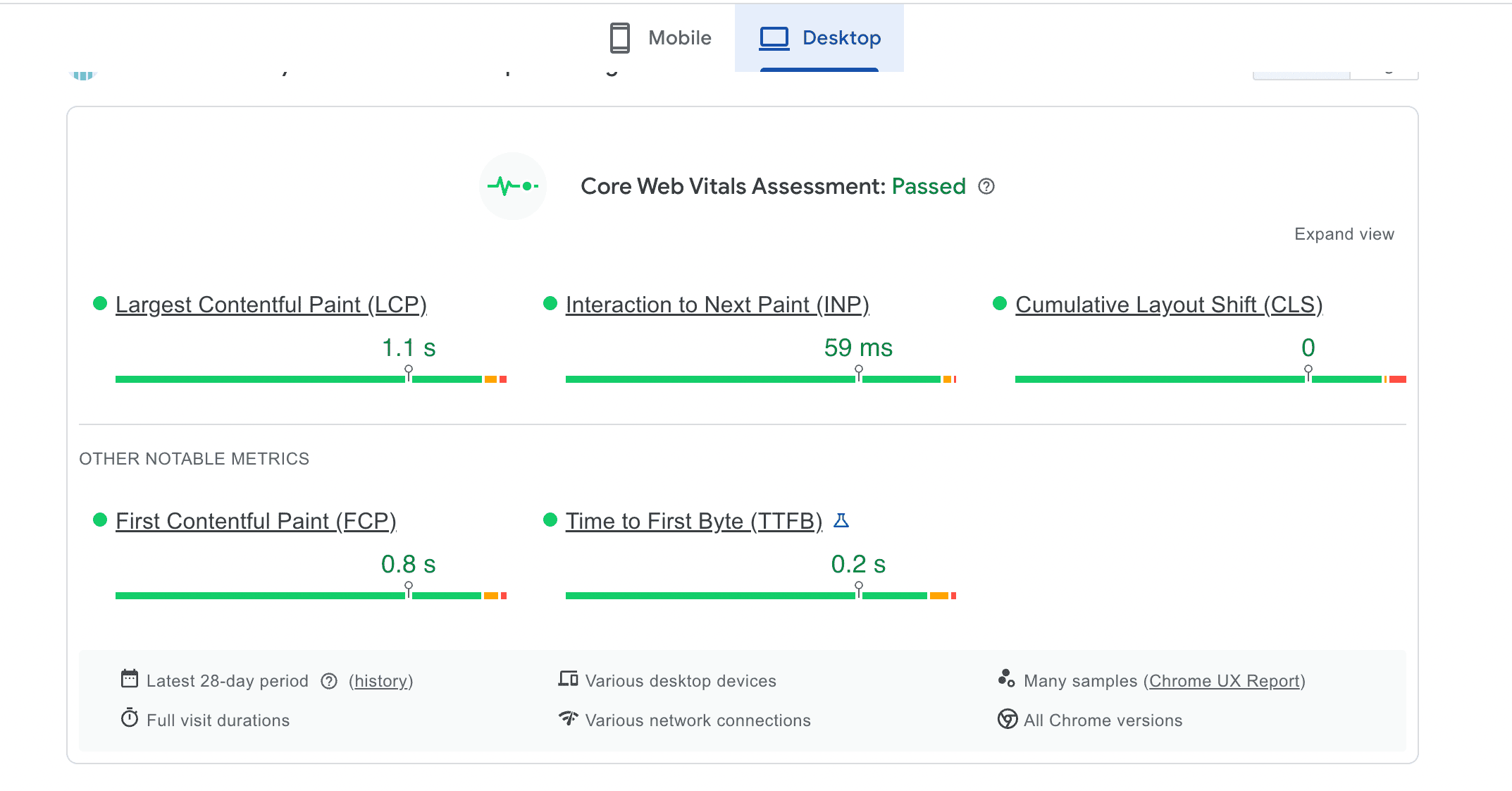
▶ What to watch: The most important metrics are LCP (Largest Contentful Paint — how long it takes for the main element to appear) and CLS (Cumulative Layout Shift — elements moving around while the page loads). CLS can be devastating for conversions: a user aims for a button, but elements are still loading and shift its position right as they click.
Information Architecture
Within five seconds of landing on your page, a visitor should know where they are, what your company offers, and what they should do next. If they don't know — they leave. This is known as the 5-second rule. A common mistake is designing content around "what we want to tell users" rather than "what information users are looking for." The content on your homepage — and even the labels in your navigation menu — should be written in terms your visitors understand, addressing their needs, not yours.
Navigation and Contact Forms
This area covers everything related to how your site is structured. Proper button placement, visibility, ease of navigation, accessibility of key elements and information, payment method options, and so on. Optimizing your web form is crucial for conversion rate optimization, as an effective form can significantly increase the percentage of visitors who complete desired actions. Any element that disrupts the user experience — like a hard-to-find button or an unclear call to action — can cost you a customer. Additionally, reducing the number of required fields in forms can decrease friction and improve conversion rates.
Mobile Version
Depending on your industry, up to 70% of online visits today happen on a phone. Designing a modern, responsive website is now just as important as designing the desktop version. Make sure you account for tapping (instead of clicking), appropriate form and field sizes, and consider removing elements like heavy animations or large banners that don't add value for mobile users. It's also important to understand your users' behavior: are they visiting on mobile to gather information, but converting later on desktop? Or are they completing purchases directly on their phone? Google Analytics and qualitative research will help you answer those questions.
The analyses covered in the first step should help you identify potential UX/CX issues on your site. Session recordings and heat maps are especially useful here.
Persuasion
In the UX section, we touched on the importance of information architecture. When a visitor lands on your site, they should immediately know whether they’re in the right place and whether your offer is relevant to them. Especially for service businesses and SaaS, the headline is often the single biggest factor affecting your bounce rate.
Beyond information structure, persuasion elements matter just as much — meaning: does your site actually convince visitors to choose your product or service, and does it build trust?
- Social proof — customer reviews, testimonials, ratings, number of units sold, logos of well-known clients. Social proof can significantly enhance conversion rates by building trust.
- Trust badges and security badges — SSL certificates, payment logos, money-back guarantees, and security badges. Visual trust signals and security badges placed near CTAs or 'Add to Cart' buttons, are crucial for establishing credibility and can increase conversions by a few percentage points.
- Benefit-focused, action-oriented language — instead of “Our innovative solution,” write “You’ll save 10 hours a week.” Using action-oriented, benefit-driven language can improve conversion rates. Talk about the customer, not yourself.
- Video — reinforce your message with a compelling video showcasing your product or featuring customer case studies.
- Urgency — messages like “Only 3 left in stock,” “Offer ends today,” or “2 spots remaining” work because they shorten the decision-making window. The user feels that if they don’t act now, they’ll miss out. This works especially well for promotions, event registrations, and limited offers. Use it with restraint — and always honestly.
- FOMO (fear of missing out) — a psychological mechanism based on the fear of being left behind while others benefit. Examples: “85% of companies in your industry already use our solution,” “12 people are viewing this offer right now.” FOMO works because people naturally look to others for social proof — if others are doing it, it’s probably worth it. There’s also a mild anxiety that kicks in: “Am I missing something important?” Just like with urgency — credibility is everything. Use real data, genuine customer reviews, and actual statistics rather than inflated numbers. Well-designed FOMO marketing campaigns often combine urgency, social proof, and clear benefits to nudge visitors toward faster decisions.
Experiments and A/B Testing
A successful conversion rate optimization process starts with analyzing data to identify where users drop off—such as abandoning a form or leaving before completing a purchase. This structured approach helps pinpoint specific problems and highlights opportunities for improvement, even when your site is functioning correctly. Beyond fixing issues, the process involves implementing new elements and strategies, like the persuasion techniques mentioned above, to further enhance results.
The key is an experimental mindset. Instead of guessing what will work, test specific changes and measure their impact on conversions. To measure conversion rate optimization effectively, you need to track and analyze the results of each change, using data collection and continuous monitoring to evaluate improvement effectiveness. The best tool for this is A/B testing, a common method used in CRO to improve conversion performance across different pages and site elements. With A/B testing, some users see the current version of the page and others see the new one—giving you a real, data-backed assessment of whether a change actually helps. A/B testing is essential for identifying which variations drive the strongest conversion performance. You can test small elements like button color or a headline, as well as bigger changes like adding a video or a reviews section. These are examples of conversion rate optimization techniques, which include optimizing web forms, calls to action, and other user experience elements.
For running A/B tests, dedicated testing tools like VWO, Optimizely, AB Tasty are worth looking into. These platforms let you create different versions without touching your code, split traffic between variants, and analyze which version converts better. Using tools like Hotjar enables testing across website elements such as copy, content offers, imagery, form fields, and entire pages.
Important: A/B testing only makes sense with sufficient traffic — roughly a minimum of 1,000 unique weekly visitors. With less traffic, differences may be too small to detect reliably.
If A/B testing isn’t an option yet, you can make changes for a set period of time and compare results before and after. The key is to test one thing at a time and avoid making major changes to your marketing campaigns in parallel — otherwise it’ll be hard to know what actually drove the result.
The continuous cycle of testing and learning is crucial to an effective CRO strategy. Regularly testing and iterating on website elements is crucial for ongoing conversion rate optimization.
Tools That Drive Conversions
Beyond A/B testing, it’s worth exploring tools that directly support conversion growth. These solutions help you better engage visitors, build trust, and close the loop on purchasing decisions. Many of them offer free trials, so you can test their impact on your overall conversion rate at no cost.
- Exit pop-ups — appear when a visitor is about to leave the page, giving you one last chance to keep them, for example by offering a discount.
- Social proof tools — pull in authentic reviews from external platforms like Google Reviews. These often carry more weight than testimonials placed directly on your site.
- Live chat and chatbots — enable quick contact and help resolve visitor doubts in real time.
- Callback widgets — let visitors request an immediate phone call from your sales or support team. A callback widget helps address hesitations and often builds more trust than chat alone.
- Countdown timers — support a sense of urgency for time-limited offers.
- Personalized pop-ups and sliders — display different messages based on user behavior (e.g., time on site, pages visited), making them more relevant.
- Multi-step forms — break long forms into several simpler steps, reducing the sense of effort and increasing completion rates.
- Product/content recommendations — suggest what else might interest the visitor based on their previous actions on the site. For online stores, combining smart recommendations with other ecommerce conversion optimization tactics can significantly increase average order value.
- Sticky bars — always-visible elements that encourage action. They can promote your primary conversion goal, but they’re also great for softer conversions. Someone visiting your site might not be ready to fill out a contact form, but they might happily sign up for a webinar.
For cro success, it’s important to approach these tools experimentally and track which ones actually influence user behavior and improve conversions.
How to Get Started — A Step-by-Step CRO Plan for Small Businesses
You don’t need to hire an agency or roll out advanced tools right away. To start, a simple, organized action plan is enough:
Month 1 — Install Google Analytics 4 and a session recording tool. Try looking at your site through your visitors’ eyes — notice where they get stuck, what distracts them, and what might be confusing. Also talk to 3–5 current customers and ask what doubts they had before making a decision. Understanding your conversion funnel at this stage helps you identify where users drop off and which steps need the most attention.
Month 2 — Fix the issues you identified. Improve the UX elements that were hurting conversions, simplify the user journey, and check your page load speed. Focus on optimizing high-impact areas such as your homepage, pricing pages, and key landing pages, as these can significantly influence conversion outcomes. Track micro conversions like newsletter signups or adding items to a wishlist to better understand user engagement. Remember, each unnecessary step in the checkout process represents a potential loss of sale, so streamline wherever possible. At the end of the month, compare your results — see how conversion changed before and after your fixes.
Month 3 — Analyze and experiment. At this stage, you can start testing specific changes and new solutions. Introduce them one at a time so you can clearly assess the impact. The main goal is to drive macro conversions, such as completed purchases or booked meetings. Track average order value to measure the effectiveness of your CRO efforts and set benchmarks for improvement. Your experiments should aim to boost conversions by reducing friction and enhancing the user experience. Start with simple things:
- Remove unnecessary fields from your forms
- Test different headline variations
- Add social proof elements
- Try out a callback widget or an exit pop-up
Most Common CRO Mistakes
Knowing what to avoid is just as valuable as knowing best practices. Here’s what to watch out for:
- Not having analytics in place — making changes only makes sense if you’re measuring their impact. Without data, you’re flying blind.
- Testing too many things at once — if you change the headline, button color, and page layout simultaneously, you won’t know what actually worked. Make changes one at a time.
- Ending tests too early — after 3 days, results are essentially random. Good tests should run for at least 14 days.
- Focusing on minor details — many teams get too fixated on small things (like button color) while overlooking far more impactful issues (like an unclear value proposition or a complicated checkout process).
- Only optimizing the homepage — conversions happen across your entire site: product pages, forms, pricing pages. Optimize the whole journey, not just the front door. Use conversion funnel analysis to identify user drop-off points and ensure you’re improving every step of the journey, not just the homepage.
- Ignoring the mobile version — as we mentioned earlier, depending on what share of your traffic comes from mobile, that’s how much attention you should give it. Make sure your changes and experiments are applied to the mobile experience too, not just desktop.
- Expecting big results from a single change — if your site has a serious bug, fixing it can produce a quick, noticeable lift. But if your site is already in decent shape, one change is unlikely to move the needle dramatically. A series of well-chosen improvements, however, can meaningfully lift your conversion rate — and your revenue.
- Underestimating traffic quality — remember, it’s not just about your site. It matters who’s landing on it. If most of your traffic comes from poorly targeted campaigns with misleading messaging, even the best-optimized page won’t save you. Always analyze traffic quality alongside your site optimization efforts, and use well-chosen marketing KPIs to guide you.
Analyzing user behavior is especially important for understanding how visitors interact with your site, particularly when you’re paying for high-cost, high-intent local search traffic.
Summary: CRO Is an Investment, Not a Cost
If you run a small business and want more customers — before you increase your ad budget, take a hard look at your website. Do visitors immediately understand what you offer? Is your form too complicated? Can they easily get in touch with you? Is there anything on your site that convinces them to trust you?
Those are CRO questions. And the answers can change your business results — without spending another dollar on traffic.
Found this article helpful? Share it with someone else who runs their own business.
Check out other posts
Start generating leads today!
Start a 14-day free trial now,
set up the widget on your site, and see how many more leads you can capture with CallPage
- No credit card required
- 10 minutes set up
- 14 days fully-features free trial