How to Increase the Number of Incoming Calls for Your Business in 2027?
To increase business phone calls in 2027, you need to do four things well: be visible where buyers now search (including AI assistants), make calling the easiest action on your website, answer every call fast, and measure which calls actually turn into revenue.
Table of Contents
- Why phone calls still matter for businesses in 2027?
- How to generate more phone calls before visitors reach your website
- Key website elements that drive more phone leads
- Make sure every call gets answered
- Track, measure and optimize your phone leads
- Putting it all together: a ready-made phone lead system with CallPage
This guide covers what changed in 2026 and what to do about it, from Google Ads call features and generative engine optimization (GEO) to callback widgets, AI voice agents and AI-qualified call tracking. Each section ends with steps you can apply before the beginning of 2027.
Why phone calls still matter for businesses in 2027?
Phone calls remain one of the highest-intent conversion channels because people call when they are close to a decision and need a human answer. A form says "maybe later"; a call usually says "help me now."
Which businesses benefit most from inbound calls
Calls matter most where the purchase is expensive, urgent, complex or personal:
- Home and emergency services – plumbing, HVAC, roofing, locksmiths. The customer needs someone today and buys from the first company that answers.
- Legal, financial and insurance services – high stakes, many questions, and trust is built in conversation.
- Real estate and property developers – viewings, availability and financing questions.
- B2B services – quotes and qualification for higher-value deals.
- Education and training – course fit, schedules, financing.
- Travel and hospitality – group bookings, special requests, last-minute changes.
The common factor: the buyer has questions that a product page cannot fully answer.
Phone leads show strong purchase intent
You will often read that calls convert 10x better than web leads. In Invoca's 2026 Lead Conversion Benchmarks Report, built on more than 70 million calls across 10 industries:
- 38% of answered calls are sales leads.
- 42% of those leads convert during the call itself.
- Improving answer rate, lead rate and conversion rate by five percentage points each would lift conversions by roughly 40% from the same call volume.
Individual companies see a clear gap between channels. Home security provider Vivint found its inbound calls converted about 30% better than form leads; after optimizing landing pages for calls, it increased inbound calls by 33% and new customers from marketing by 76%.
Speed-to-lead decides who wins the customer
The value of an inquiry decays in minutes. A Harvard Business Review study of 2,241 US companies found that firms contacting a lead within an hour were nearly seven times more likely to qualify it than those that waited longer, and over 60 times more likely than those that waited a day or more. An earlier study by the same lead researcher, covering 15,000 leads at six companies, found qualification odds 21 times higher at five minutes than at 30. The sample is small and dated, but it is where the widely quoted "five-minute rule" comes from.
A phone call is the fastest possible response because the conversation happens while interest peaks. The flip side: an unanswered call is a lead lost at full intent. In an analysis of 18 million missed calls by Quo, only 15% of callers left a voicemail. The rest simply moved on, often to a competitor.
Calls build trust and shorten the sales cycle
A conversation does several jobs at once that would otherwise take days of emails:
- Answers objections immediately – price, timing, fit and guarantees are covered in minutes.
- Qualifies the prospect – budget, need and timeline come out naturally in dialogue.
- Builds trust – a real voice and a clear answer reassure buyers in high-risk purchases.
- Moves to the next step – a quote, a visit or a booked meeting can be agreed on the spot.
How to generate more phone calls before visitors reach your website
Some of your best calls will never touch your website. They start in a search ad, a Maps listing or an AI answer, so each of those surfaces needs a visible, accurate, tappable phone number.
Google Ads call features in 2026: call assets replace call-only ads
The biggest paid-search change this year: Google is retiring call-only ads (now called call ads). Since February 2026 you can no longer create new call ads, and from February 2027 existing ones stop serving. Google's official guidance is to replace them with responsive search ads (RSAs) that carry call assets.
A call asset adds your phone number and a call button to a search ad. On mobile, a tap dials you directly; the searcher can also click through to your site instead. How to use call assets well:
- Migrate now, not in January 2027. Google provides a step-by-step transition guide. Benchmark your current call ad performance first so you can compare.
- Schedule the asset to your staffed hours – or keep it running 24/7 if an AI voice agent answers after hours (see section 4).
- Use a Google forwarding number so calls are tracked and counted as conversions.
- Write call-focused headlines for high-urgency keywords: "Speak to an engineer now", "Free quote by phone in 10 minutes".
- Add location assets if you have several branches, so the right local number shows.
- Expect fewer guaranteed calls per impression. Unlike call ads, RSAs let users choose between calling and clicking, so the landing page has to convert calls too (section 3).
AI-powered search and generative engine optimization (GEO)
AI assistants have become a mainstream way to find local businesses. BrightLocal's Local Consumer Review Survey 2026 found that use of ChatGPT and other generative AI tools for local recommendations jumped from 6% to 45% in one year, making AI the third most-used source after Google and Facebook.
Those AI referrals produce strong phone leads. In Invoca's 2026 data, 49% of answered calls referred by ChatGPT were sales leads – about 10 points above the all-channel average and the highest of any channel measured. Volume is still small, but quality is high.
How to get recommended (and called) by AI search:
- Be consistent everywhere AI looks. ChatGPT, Gemini, Google AI Overviews and Copilot assemble answers from different sources: Google Business Profile, Bing Places, Apple Business Connect, Yelp, industry directories and your own site. Name, address and phone number (NAP) should be identical on all of them.
- Answer real questions on your site in plain language. Prices or price ranges, service areas, response times, opening hours, what happens on the first call. AI systems quote specific, factual statements far more readily than marketing slogans.
- Use structured data. LocalBusiness schema with telephone, openingHoursSpecification and areaServed gives AI and search engines a machine-readable version of your contact details.
- Earn mentions beyond your own site. Reviews, local press, partner pages and industry rankings are the evidence AI uses to decide who to recommend.
- Publish your pricing if you can. Google's AI can now call local businesses on a user's behalf to ask about price and availability ("Have AI check pricing", currently in the US). A business that answers clearly – on its website or on the phone – ends up in the summary the customer receives.
Google Business Profile and Google Maps optimization
Be aware of one 2026 change. Google has removed the one-tap call button from many organic map-pack results on mobile, and AI-powered local packs often show fewer businesses. Searchers now usually open your profile before they can call, so the profile itself has to persuade.
GBP checklist for more calls:
- Phone number: a local number, identical to your website,
- Hours: accurate regular, holiday and special hours. Wrong hours lose calls and, on LSAs, can now cost you money.
- Categories and services: the most specific primary category plus services that match how customers describe their problem.
- Photos and posts: recent team, location and work photos; posts with offers or answers to common questions.
- Q&A and description: state plainly what callers get ("same-day quotes by phone").
Reviews: the gate before the call
Reviews decide whether a searcher calls you or the next result. Ask every satisfied customer for a review right after the job, reply to every review in a personal way, and spread reviews across Google, Facebook and your industry platforms, since AI tools read beyond Google.
Local SEO for high-intent searches
Local SEO captures the searches most likely to end in a call: "emergency electrician near me", "divorce lawyer [city]", "same-day boiler repair".
- Build a page per service and per location with the local phone number, service area, prices or price ranges, and a clear call CTA.
- Target problem and urgency keywords, not only service names: "no hot water", "car won't start", "need a lawyer today".
- Keep NAP citations consistent across directories, chambers of commerce and industry listings.
- Make pages fast on mobile, since most local, high-intent searches happen on a phone.
Other channels that drive calls directly
- Click-to-call social ads – Meta and LinkedIn campaigns can use a call button as the main CTA.
- Lead form ads with instant callback – connect lead ads to a system that calls the prospect within seconds of submitting.
- Apple Business Connect and Bing Places – free listings that feed Apple Maps, Siri, Bing and ChatGPT.
- Industry marketplaces and directories – for many trades and professional services, these still rank and get cited by AI.
- Offline and video – a dedicated tracked number on vehicles, print, radio or YouTube shows what each channel delivers.
How to increase phone leads from your website - Key website elements that drive more phone leads
To get more calls from your website, make calling the obvious, low-effort next step on every page where a visitor might have a question. Most sites treat the phone number as contact information. High-converting sites treat it as a call to action.
1. Make your phone number visible on every page
Visitors should never have to search for your number. Place it:
- In the header, top right on desktop, where eye-tracking habits expect contact details.
- In the main navigation or next to the primary CTA button.
- Inside high-intent content – pricing, service pages, comparison pages, FAQs and checkout or quote steps.
- On the contact page and in the footer, with full address and hours for local trust.
Use the same number format as your Google Business Profile, or a tracked number that swaps dynamically (section 5).
2. Use click-to-call on every number
On mobile, every number should be a tel: link that opens the dialer with one tap. Plain text forces visitors to copy, switch apps and paste – and many won't. On desktop, a click to call html link can open a softphone or calling app, or you can pair the number with a callback option (point 5).
Also check that your number isn't an image, isn't broken by formatting, and includes the country code (if you are selling internationally).
3. Give visitors a reason to call
A bare phone number answers "how?" but not "why?". Add one short line that says what the caller gets:
- "Get a fixed-price quote in 10 minutes – call now"
- "Talk to a specialist about which plan fits your team"
- "Not sure what you need? We'll diagnose it over the phone for free"
- "Same-day appointments – call before 2 p.m."
The best value statements match the page. A pricing page promises a quick quote; a technical page promises an expert answer.
4. Make calling a clear, contextual CTA
Turn the number into a button with action-focused copy: "Call for a free quote", "Speak to an advisor", "Book by phone". Place call CTAs where questions naturally arise:
- After pricing tables and plan comparisons
- Next to complex product specifications
- At the end of case studies and service descriptions
5. Use callback widgets to remove friction
Many visitors won't dial – they are at a desk, unsure whom to ask for, or worried about waiting on hold. A callback widget lets them type their number and get a call from your team within seconds.
This turns passive interest into a live conversation while intent is at its peak, which is speed-to-lead in its purest form. Instant callback tools such as CallPage automatically ring your team and connect them with the visitor, typically in under 30 seconds. Good callback widgets also:
- Trigger on behavior – time on page, scroll depth, exit intent or a click on an existing "Call me" button.
- Let visitors schedule a call for later when your team is busy or offline.
- Connect to forms and lead ads, so a form submission triggers an immediate call instead of a reply hours later.
- Route calls to the right department based on the visitor's choice.
Keep the pop-up relevant and unobtrusive: the right message on the right page converts better than a widget that interrupts everyone.
6. Optimize for mobile-first calling
Mobile visitors are the easiest to convert by phone because the dialer is one tap away.
- Use a sticky call button fixed to the bottom of the screen, within thumb reach.
- Keep tap targets large – at least 44-48 pixels high.
- Load fast – a slow page loses the visitor before the call button appears.
- Simplify forms to name and phone number where a call is the next step anyway.
7. Show availability and response times
Uncertainty stops people from calling. Tell them what to expect:
- "Lines open Mon–Fri 8:00–20:00, Sat 9:00–14:00"
- "Average wait time: under 1 minute"
- “We will connect you with our team in 28 seconds”
Make sure every call gets answered
Generating more calls only pays off if someone answers them. With roughly 44% of business calls not reaching a person in Invoca's benchmark, improving the answer rate is often the cheapest way to increase inbound leads – you are capturing demand you already paid for.
AI voice agents: 24/7 answering without hiring
An AI voice agent is software that answers phone calls in natural speech, understands what the caller wants and takes action. Modern agents built on large language models can:
- Answer common questions from a knowledge base – prices, availability, opening hours, service areas, order or repair status.
- Qualify leads with the questions your sales team would ask: need, budget, timeline, location.
- Collect contact details and save them, together with a call summary.
- Book appointments directly into Google Calendar, Outlook or your booking system.
- Transfer calls to the right person based on the topic or needs.
- Handle several calls at once, so nobody waits on hold during peak hours.
Investment is moving fast. A Gartner survey of 199 service leaders in April–May 2026 found that AI spending in customer service rose 38% while overall service budgets grew by just 2%.
Where AI voice agents work best: repetitive, predictable calls ("Do you have a slot on Friday?", "How much is a service?", "Where is my order?"), first-line qualification and appointment booking. Tools such as the CallPage AI Voice Agent answer on your business number 24/7, follow your instructions and knowledge base, pass any call to your team, and create recording and AI summary of every conversation.
After-hours call handling
Customers search and call in the evenings and at weekends, especially for urgent services. Voicemail is not a solution: as noted above, only about 15% of callers leave a message. Better options, from simplest to most complete:
- Callback scheduling – the website widget can let callers pick a time for your team to call back (and set automatic call for this hour)
- Instant SMS follow-up – an automatic text after a missed call ("Sorry we missed you – reply with a good time to call").
- AI voice agent – answers the question, qualifies the lead and books the appointment at 2 a.m., then hands everything to your team in the morning.
Call routing
Routing decides whether the caller speaks to the right person in seconds or bounces between departments. Set up:
- Location routing – calls reach the nearest branch.
- Round-robin or simultaneous ringing – several salespeople ring at once and the first available answers.
- Overflow rules – after a set number of rings, the call goes to a backup group or an AI agent rather than voicemail.
Callback processes for missed calls
Every missed call should trigger a follow-up within minutes, not at the end of the day. Automate it:
- Set a service-level target (for example, call back within 5 minutes during business hours) and report against it weekly.
- Use automatic callbacks that dial your team first, then connect the customer once someone picks up.
- Retry at least two or three times across the day before closing the lead.
Combining AI and human support
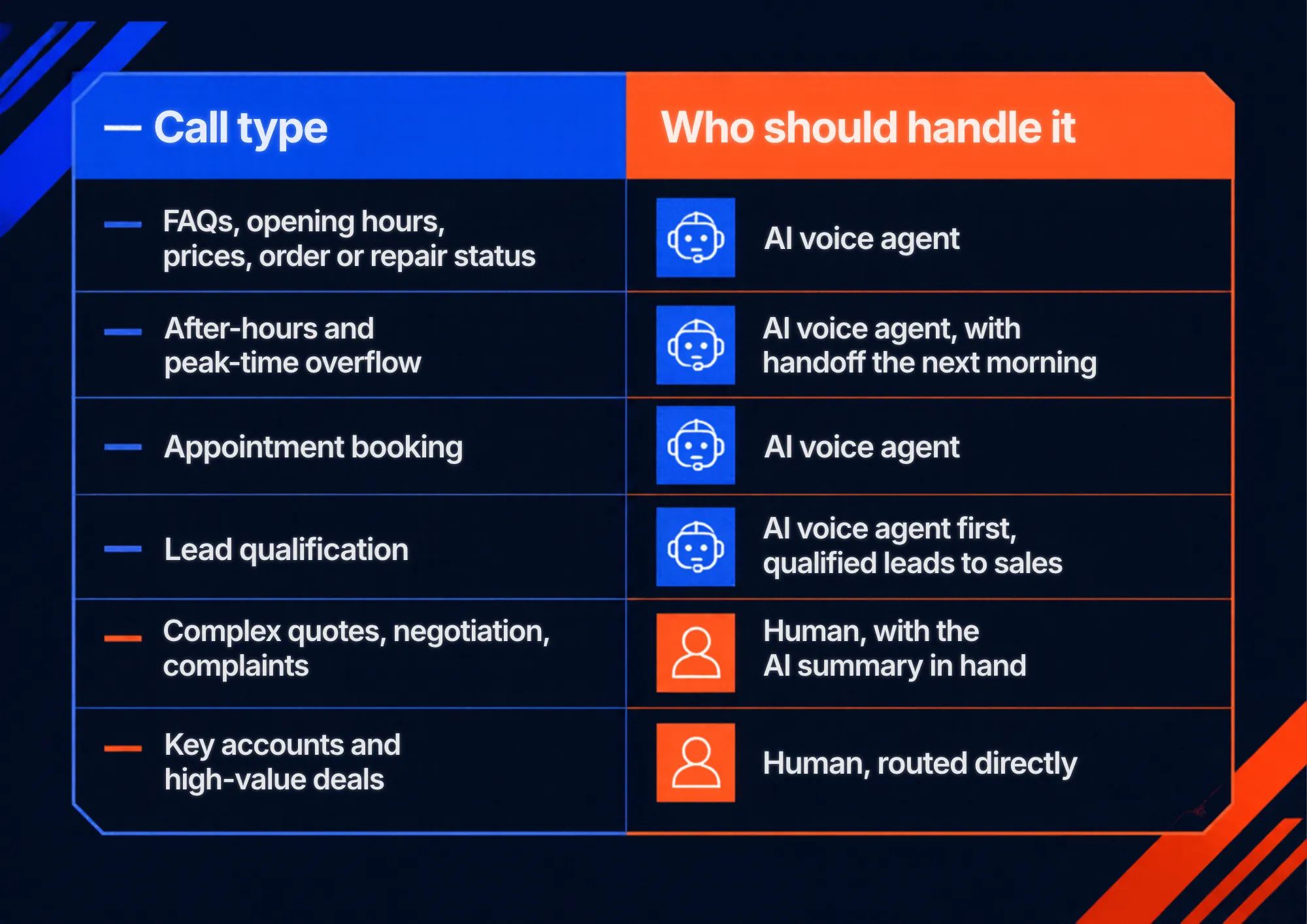
The most effective model in 2026 is hybrid. AI handles volume, speed and availability; people handle complexity, negotiation and relationships. Gartner predicts that no Fortune 500 company will fully replace human customer service staff with AI by 2028, and the same logic applies to smaller businesses.
A practical split:
Track, measure and optimize your phone leads
You don't need an enterprise analytics stack to know where your calls come from. For most small and mid-sized businesses, three simple steps are enough: collect every call in one place, track the source of each call, and record conversations so you can learn from them.
Step 1: Collect all your calls in one place
In many small businesses, calls are scattered: some reach the office landline, some a salesperson's mobile, some go to voicemail and some come through the website. Nobody sees the full picture, and missed calls disappear without a trace.
Start by routing all business calls through one system, so every call – answered, missed or handled by an AI agent – is logged with the caller's number, time and outcome. That alone answers basic questions you may not be able to answer today:
- How many calls do we get per week?
- How many do we miss, and at what times?
- How quickly do we call back?
Step 2: Set up call tracking
Call tracking shows which marketing channel made the phone ring. There are two main approaches.
Dynamic call tracking (dynamic number insertion, DNI) swaps the phone number on your website for each visitor, based on how they arrived, so a call can be linked to a specific campaign or keyword. It is powerful for businesses with large ad budgets and many campaigns, but it needs a script on the site, a pool of numbers and more setup and cost.
Static call tracking is simpler and works for most small businesses. The rule is one source, one number. You get a virtual number for each channel you want to measure and publish it only in that place:
- Google Business Profile – calls from Google Maps and local search
- Website – calls from visitors who dial the number on your site
- Google Ads call assets – calls straight from your search ads
- Offline marketing – vehicles, flyers, billboards, local radio
Every call to a number is attributed to its source. There is no code to install, nothing breaks when your site changes, and it also works for offline channels that no website tool can track. Three or four numbers are usually enough to see which channels deserve more budget.
If you run Google Ads, you can also turn on Google's free call conversion tracking for calls from your ads. Since April 2026, Google uses AI to assess recorded calls and counts only qualified calls as conversions, which helps your bidding focus on real customers rather than wrong numbers.
Step 3: Record calls and use transcripts
Call recordings show what actually happens after the phone rings. With recordings, transcripts and AI summaries, you don't need to listen to every call to learn from them:
- Check lead quality – which calls were real sales opportunities, and from which source.
- Find the questions customers ask most and answer them on your website, in ads or in your AI agent's knowledge base.
- Coach your team – spot calls that ended without a quote, a booking or a clear next step.
- Resolve disputes about what was agreed on the phone.
When you record calls, inform callers and follow local privacy rules, such as GDPR in the EU.
Where to see your call data
You have two practical options, and many businesses use both:
- Your call provider's panel – if your numbers, callback widget or AI voice agent come from one provider, its panel usually shows all calls, sources, recordings and reports in one place. For a small business, this is often all you need.
- Your CRM – integrations with tools such as HubSpot or Pipedrive save each call, its source and notes on the customer record, so you can see which calls turned into deals and for how much. Tools like Zapier connect most other systems.
Putting it all together: a ready-made phone lead system with CallPage
Each section of this guide covers one part of the same pipeline: generate the call, answer it, then measure it. You can build that pipeline from separate tools, or set it up in one place. In CallPage, the main parts from this article are ready to use and managed from a single panel.
1. Virtual numbers for calls that start outside your website
Many high-intent calls start in a Google ad, a Business Profile, an AI answer or an offline campaign. With CallPage you can order virtual numbers, usually active within a few hours, and assign one to each source. Static call tracking then shows exactly how many calls each number received.
2. A callback widget to get more calls from your website
Many visitors won't dial themselves. The CallPage callback widget invites them to leave their number and connects them with your team in up to 28 seconds, while their intent is still high. You can trigger it by time on page, scroll depth or exit intent, or attach it to your existing "Call us" buttons. It can also call back leads from your website forms and lead ads, and lets visitors schedule a call when your team is offline.
3. An AI Voice Agent so no call goes unanswered
The CallPage AI Voice Agent answers on your business number when your team is busy, after hours, or around the clock, depending on how you configure it. It answers questions from your knowledge base, collects the caller's details, books meetings in Google Calendar or Outlook, and transfers the call to a person whenever needed. It can handle several calls at once, and every conversation is saved with a recording and an AI summary.
4. One panel for tracking, reports and your team
Calls from virtual numbers, the website widget and the AI Voice Agent all land in one panel with reports on volume, sources and answered and missed calls. You add team members, set routing rules and connect your CRM there, with integrations for HubSpot, Pipedrive and Zapier, plus an API and webhooks.
Costs
As an example, here is a typical setup for a small or mid-sized business:
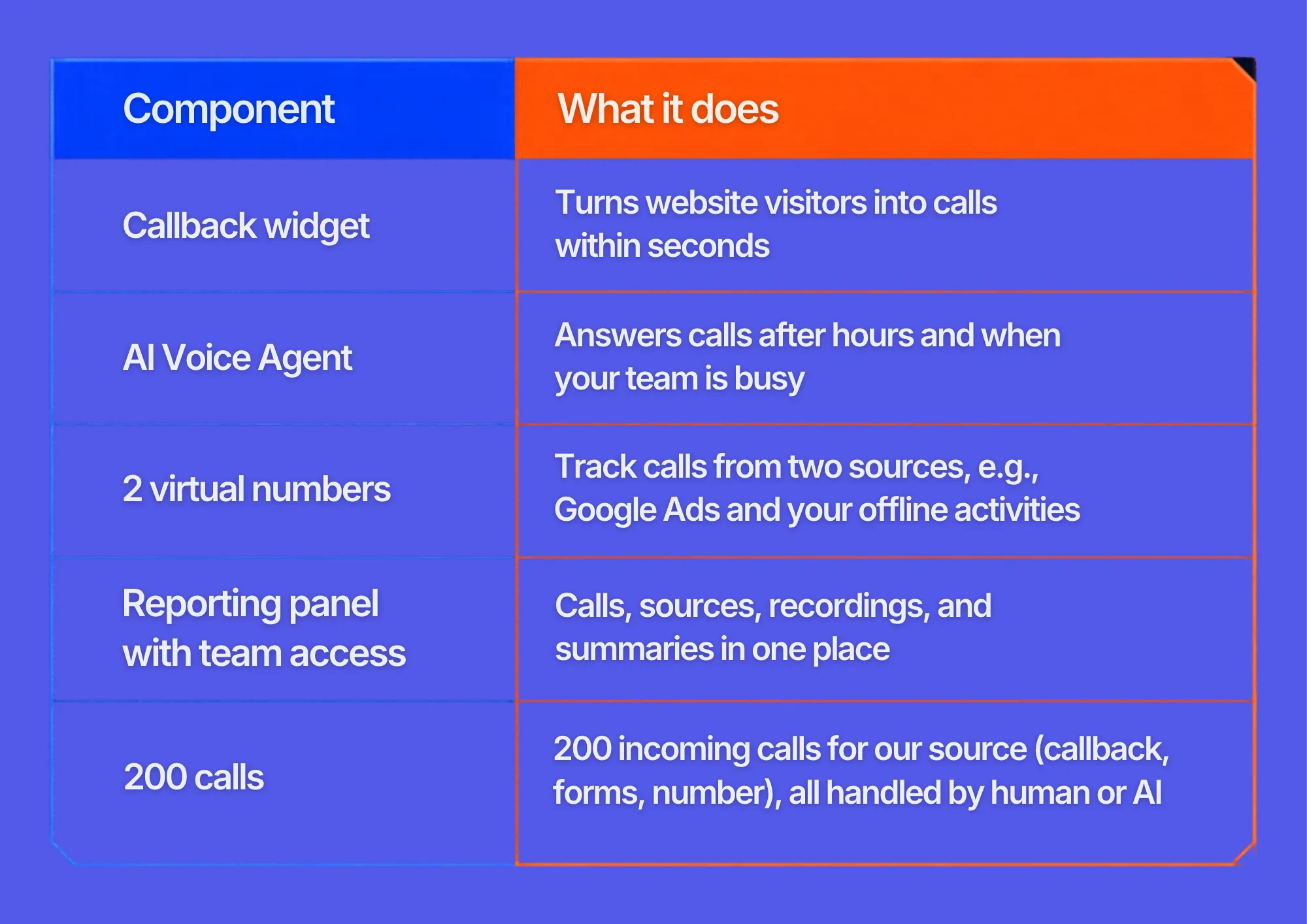
The whole setup costs about $250 per month in total. For comparison, that is less than a single part-time receptionist, and it covers evenings and weekends too. You get a self-service panel to manage everything, plus help from an account manager when you set up or adjust your agent.
Frequently asked questions about increasing business phone calls
How can I get more calls from my website?
Show a clickable phone number in the header of every page, add a short reason to call next to it, use a sticky call button on mobile, and offer a callback widget for visitors who won't dial. Place call CTAs on pricing, service and comparison pages, where questions come up.
What replaced Google call-only ads?
Responsive search ads with call assets. New call-only ads can't be created since February 2026, and existing ones stop serving in February 2027.
How fast should a business respond to a phone lead?
Within minutes. Research published in Harvard Business Review found that companies contacting leads within an hour were nearly seven times more likely to qualify them than those that waited longer. For calls, the goal is to answer live, or call back within five minutes.
Can an AI voice agent answer business calls?
Yes. AI voice agents can answer 24/7, respond to common questions, qualify callers, book appointments and transfer complex calls to people. They work best alongside a human team, not as a full replacement.
Conclusion: build a better system for generating and handling phone leads
Increasing business phone calls in 2026 takes more than displaying a phone number. It takes a system with four parts:
- Be visible where customers search – call assets in Google Ads, a complete Google Business Profile, consistent listings and content that AI assistants can understand and recommend.
- Make calling easy on your website – visible, clickable numbers, a reason to call, contextual CTAs, mobile-first design and instant callback.
- Respond fast and answer every call – call routing, automated callbacks and AI voice agents that cover after-hours and peak times, with people handling the conversations that need them.
- Measure what calls are worth – call tracking, CRM integration and AI analysis.
Check out other posts
Start generating leads today!
Start a 14-day free trial now,
set up the widget on your site, and see how many more leads you can capture with CallPage
- No credit card required
- 10 minutes set up
- 14 days fully-features free trial